


How to Get Badge and Patch Designs Approved by California BSIS
Complete Step-by-Step Guide for Private Security Companies (2025)
Published: December 15, 2025 | Updated: June 10, 2026 | Read Time: 11 minutes

📌 Quick Answer
Getting badge and patch designs approved by California BSIS requires submitting a formal written request letter—signed by an authorized company representative—along with full-size, full-color design samples to the Bureau’s Badge and Patch Review division. Designs must display your company name, employee identification numbers, and “Private Security” text. Government insignia lookalikes will get rejected. The Bureau typically responds within a few weeks, though timelines vary based on submission volume. Whatever you do, don’t order badges or patches until you have written Bureau approval in hand.
Table of Contents
- Understanding BSIS Badge and Patch Requirements
- Who Needs BSIS Approval
- Legal Requirements: What the Law Says
- Design Requirements Checklist
- Step 1: Prepare Your Design Submissions
- Step 2: Create Your Formal Request Letter
- Step 3: Submit Your Application for Review
- Step 4: Wait for Bureau Response
- Step 5: Make Revisions if Needed
- Common Mistakes That Delay Approval
- Local Jurisdiction Additional Requirements
- Timeline and Processing Expectations
- Key Takeaways
Understanding BSIS Badge and Patch Requirements
California’s Bureau of Security and Investigative Services operates under the Department of Consumer Affairs with strict oversight responsibilities over the private security industry. Badge, patch, and cap insignia approval represents one of the Bureau’s most hands-on regulatory functions.
Why does this approval process exist? Public safety. The state wants to ensure security personnel can’t be mistaken for law enforcement officers or government officials. This distinction matters—impersonating a peace officer carries serious criminal penalties in California, and confusing uniforms put everyone at risk.
Private Patrol Operators face the most scrutiny here. Every design submission gets reviewed against Business and Professions Code requirements before companies can legally hand out uniforms to their employees.
📊 The BSIS Approval Process: Step-by-Step Timeline
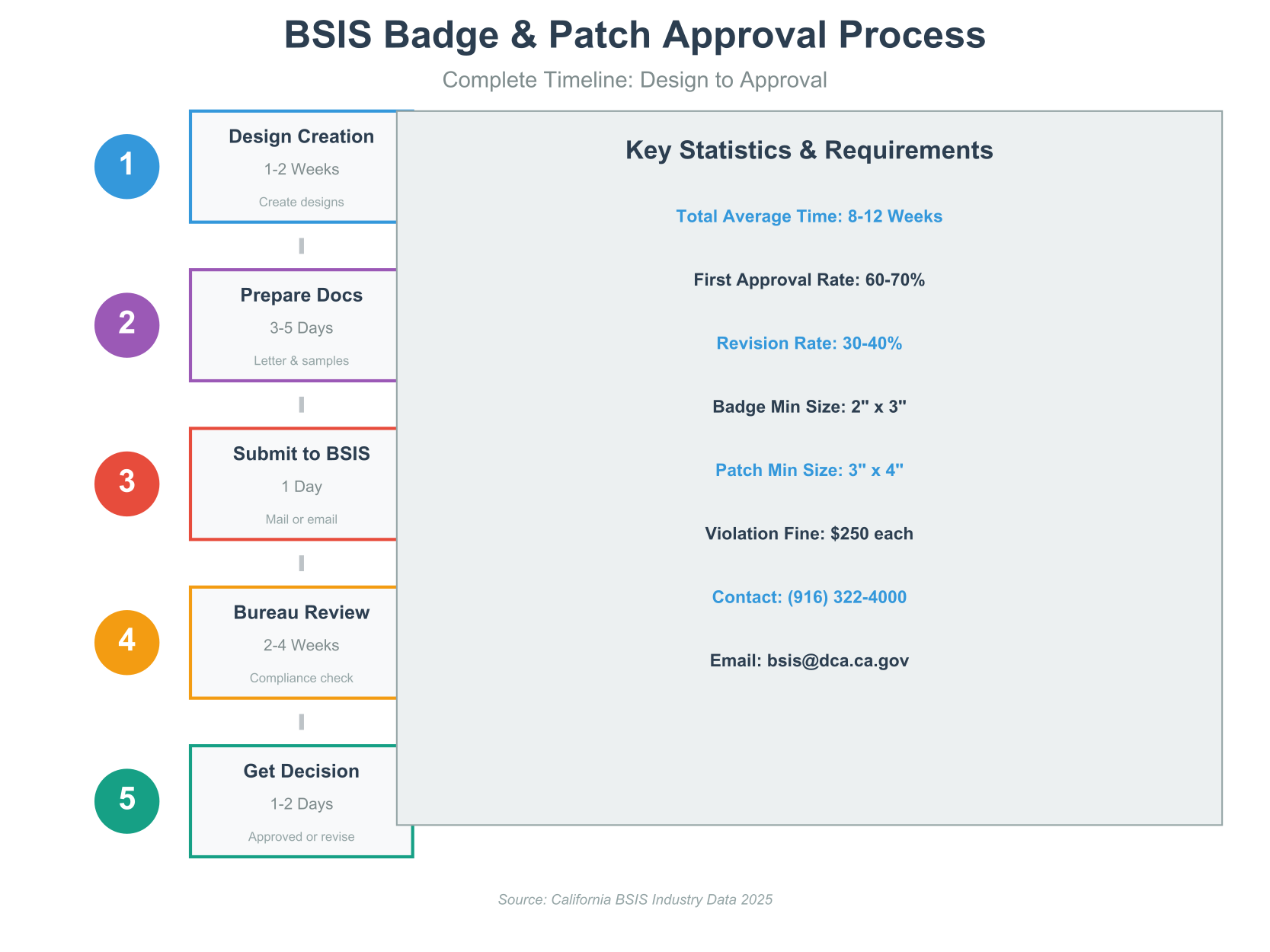
Visual timeline of the complete BSIS badge and patch approval process, including average timeframes for each step.
💡 Key Insight
This isn’t optional. Operating with unapproved badges or patches can trigger $250 fines per violation under Business and Professions Code Section 7582.26, and your license could face disciplinary action.
Who Needs BSIS Approval
Not every security professional needs to run designs past the Bureau. But most do.
Required to Obtain Approval:
- Private Patrol Operator licensees and anyone working under their license
- Security guards who wear badges while in uniform
- Personnel carrying batons or exposed firearms
- Company officers, directors, partners, and managers wearing company insignia
- Anyone working armed security assignments
- Personnel wearing company-branded cap insignia
The PSO Exception:
Proprietary Private Security Officers play by different rules. Per Business and Professions Code Section 7574.01(g)(1), PSOs only need to wear distinctive uniforms that clearly identify them as security officers. No Bureau-approved badges or patches required—though they still need identifiable security uniforms.
📜 Historical Note
California’s badge approval requirements tightened significantly in the early 2000s after several incidents where private security officers were mistaken for law enforcement due to misleading uniform designs.
📈 Growing Demand: BSIS Approval Requests Over Time
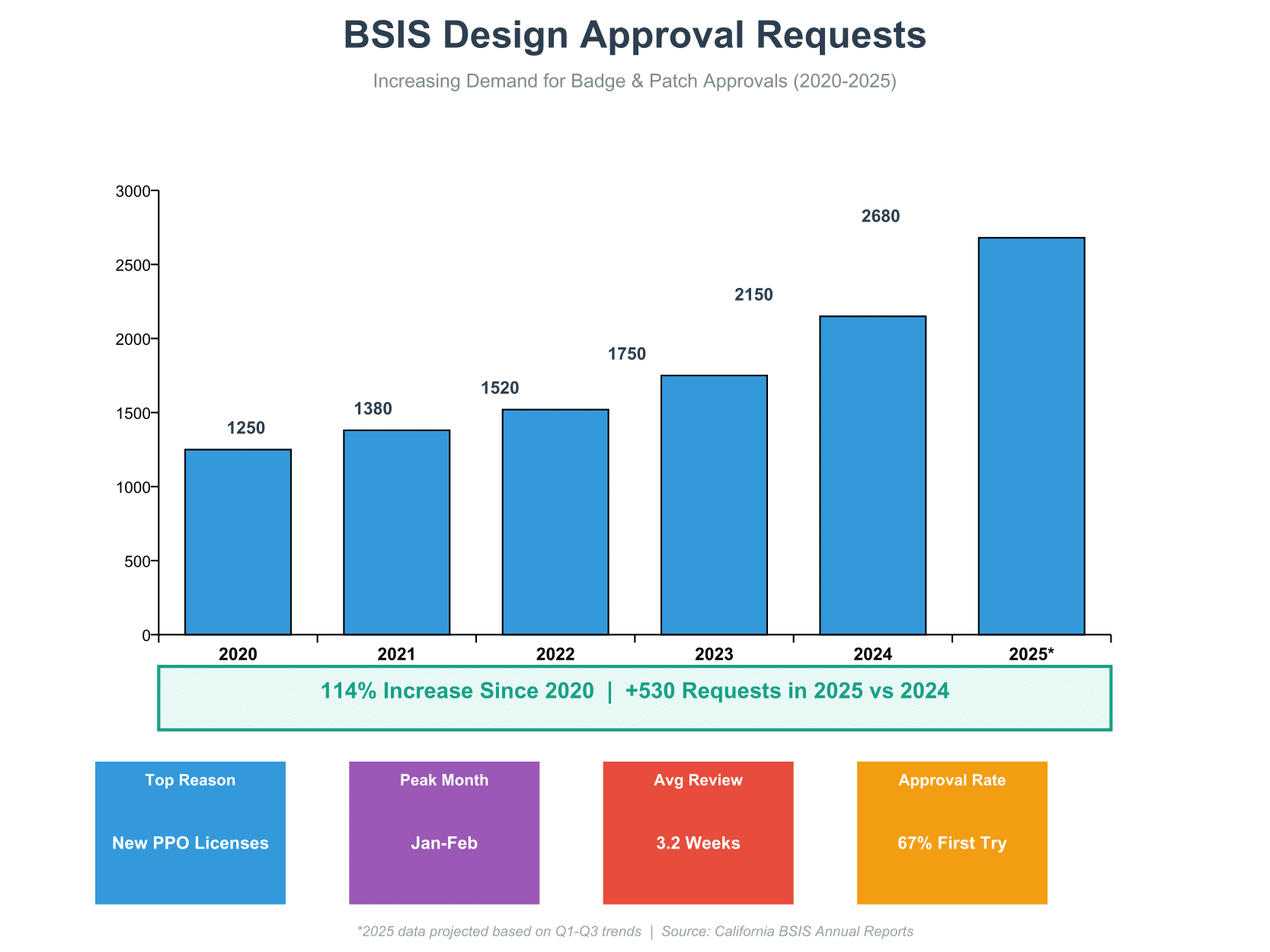
BSIS badge and patch approval requests have grown substantially as California’s private security industry expands.
Legal Requirements: What the Law Says
Getting familiar with the relevant statutes helps you create compliant designs from the start.
Business and Professions Code Section 7582.26
This section draws a hard line: private security personnel cannot use any title, wear any insignia, or make any statement suggesting connection with federal, state, or local government agencies. The law spells out several specific requirements:
- Badges are only worn while actively doing guard or patrol work
- Badges require a distinctive uniform—no badge with street clothes
- Patches reading “Private Security” go on each shoulder
- A badge or cloth patch sits on the upper left breast
- All designs need director approval first
- Badges belong on the upper left breast only—not on chains, belts, or anywhere else
Business and Professions Code Section 7582.27
Armed security personnel face extra requirements. Anyone carrying batons or exposed firearms must wear arm patches on each sleeve that read “Private Security” and show the company name. These patches stay visible at all times—no exceptions.
Business and Professions Code Section 7582.28
Every badge or cap insignia needs director approval and must display the licensee’s distinctive name plus an employee identification number. This setup lets the licensee track which employee wore which badge at any given time.
Penalty Structure
The Bureau director can levy fines of $250 per violation for badge and patch non-compliance. Run afoul of these rules multiple times and the costs pile up fast.
Design Requirements Checklist
Before sketching anything, run through this checklist:
Badge Design Requirements
✅ Must Include:
- Company name or a distinctive word indicating the licensee
- Unique employee identification number
- Sequential numbering system (001, 002, 003, and so on)
- Text readable from a reasonable distance
✅ Size Guidelines:
- The Bureau has previously approved badges at least 2 inches by 3 inches
- Font must be large enough to read from several feet away
- Employee numbers need to stand out clearly
❌ Prohibited Elements:
- No Great Seal of the State of California
- No seals, emblems, or acronyms resembling government agencies
- Nothing that could create confusion with law enforcement
- No marks, letters, words, or drawings superimposed on U.S. flags
Patch Design Requirements
✅ Must Include:
- Full company name exactly as printed on your BSIS license
- The words “Private Security” in a clearly readable format
- Professional, standard design approach
✅ Size Guidelines:
- The Bureau has previously approved patches at least 3 inches by 4 inches
- Text must be readable from a reasonable distance
- Company name and “Private Security” should be prominent
Cap Insignia Design Requirements
✅ Must Include:
- Company name or distinctive word
- Employee identification number
✅ Size Guidelines:
- The Bureau has previously approved insignias at least 2 inches by 2 inches
- Readable from reasonable distance
📊 BSIS Approved vs Prohibited Design Elements

Visual guide showing which design elements pass Bureau review versus which ones trigger rejection.
Professional security officer badges worn by private security personnel must receive BSIS approval to meet identification standards and avoid law enforcement confusion.
Step 1: Prepare Your Design Submissions
Timeline: 1-2 weeks
Stakeholders: Design team, company owner/officer, legal review
Good preparation separates first-time approvals from rejection letters. The Bureau expects specific documentation to evaluate your designs properly.
Create Full-Size, Full-Color Samples
Your submission must include exact replicas of what will be manufactured:
For Physical Samples:
- Print or create samples at actual size—no scaling down
- Use the actual colors that will appear on final products
- Match materials when possible (metallic finish for badges, fabric for patches)
- Include all text, numbers, and graphic elements
- Double-check clarity and readability
For Digital Submissions:
- High-resolution images (300 DPI minimum)
- PDF or JPG format works best
- Note actual size specifications clearly
- Ensure color-accurate representations
- All design elements should be clearly visible
While police officer badges feature distinctive law enforcement designs, private security badges need to look clearly different to maintain public safety.
✨ Pro Tip
Keep designs simple and professional. Overly complex designs with multiple elements tend to get rejected for resembling law enforcement insignia. Clean, straightforward designs sail through approval faster.
Step 2: Create Your Formal Request Letter
Timeline: 1 day
Stakeholders: Company owner, partner, or corporate officer
The Bureau requires a formal written request letter with your design submissions. Specific requirements govern both content and authorization.
Letter Requirements
Your request letter must include:
- Specific Item List: Clearly state which items you’re submitting (badge, patch, cap insignia, or any combination)
- Date: Current date when the letter is written
- Authorized Signature: Must be signed by the appropriate person based on your business structure
Who Can Sign the Request Letter
Signature authority depends on your license structure:
- Sole Ownership: Owner must sign
- Partnership: Any partner associated with the license may sign
- Corporation: Any officer associated with the license may sign
Wrong signature = automatic rejection and delays.
📄 Download the Complete BSIS Badge Approval Request Letter Template
We’ve put together a professional, ready-to-use letter template in PDF format. Download it, customize with your company information, print, sign, and submit to BSIS.
📄 Download PDF TemplateThe template includes all required elements and proper formatting for BSIS submission.
Step 3: Submit Your Application for Review
Timeline: 1 day
Stakeholders: Administrative staff, authorized company representative
Once approved, you can confidently BSIS-compliant badge options for distribution to employees.
With designs and letter ready, you’re set to submit to the Bureau.
Submission Methods
The Bureau accepts submissions via mail or through their online contact form:
Mail Submission:
Bureau of Security and Investigative Services
Attention: Badge and Patch Review
PO Box 989002
West Sacramento, CA 95798-9002
Online Submission:
Use the “Message the Bureau” feature on the BSIS website at www.bsis.ca.gov to submit your designs electronically.
What to Include in Your Submission Package
Physical Mail Package:
- Signed request letter (original signature)
- Full-size, full-color badge sample or printout
- Full-size, full-color patch sample or printout
- Full-size, full-color cap insignia sample (if applicable)
- Return envelope with your address (optional, but speeds up response)
Need help creating compliant designs? Professional custom badge design services can help ensure your badges meet all BSIS requirements from the start.
⚠️ Critical Warning
Do NOT order badges, patches, or insignia before receiving written Bureau approval. Plenty of companies have burned thousands of dollars ordering items that were later rejected. Wait for official approval before manufacturing or purchasing anything.
Step 4: Wait for Bureau Response
Timeline: Varies (typically a few weeks, depending on submission volume)
Stakeholders: Company owner, administrative staff
After submitting your designs, the Bureau reviews them for compliance with all applicable codes and regulations.
What Happens During Review
The Bureau’s Badge and Patch Review division examines your submission for:
- Compliance with size requirements
- Proper inclusion of mandatory text elements
- Absence of prohibited symbols or imagery
- Readability of company name and employee numbers
- Overall appearance and potential for public confusion
- Adherence to Business and Professions Code sections
Possible Outcomes
Approval: You’ll receive written notification that your designs passed review. Keep this approval letter on file permanently. Now you can order or manufacture your badges, patches, and insignia.
Conditional Approval: Sometimes the Bureau approves designs with minor notes or recommendations. Follow any guidance provided.
Rejection with Explanation: If designs don’t meet requirements, the Bureau will explain what needs to change. Common rejection reasons include text too small, prohibited symbols present, or designs that look too much like law enforcement insignia.
Tracking Your Submission
The Bureau doesn’t offer online tracking, but you can:
- Note your submission date and allow reasonable time for response
- Call the Bureau at (916) 322-4000 or (800) 952-5210 if you haven’t heard back after several weeks
- Reference your license number when inquiring about status
- Check email regularly for electronic responses
📊 Industry Observation
Industry consultants estimate that roughly 30-40% of first-time badge and patch submissions require revisions before approval. Most rejections involve text size issues, prohibited symbols, or designs that look too much like law enforcement.
Step 5: Make Revisions if Needed
Timeline: 1 week for revisions + additional time for re-review
Stakeholders: Design team, company owner/officer
If your initial submission gets rejected or needs modifications, don’t panic. This happens to plenty of companies.
Understanding Rejection Reasons
The Bureau typically provides specific feedback about why designs were not approved:
- Text too small to read from reasonable distance
- Employee identification numbers not distinctive enough
- Company name doesn’t exactly match license
- “Private Security” text missing or too small on patches
- Symbols that look like law enforcement or government agencies
- Great Seal of California included
- Designs too complex or ornate
- Colors or layouts similar to police badges
Making Effective Revisions
When revising your designs:
- Address Every Issue Mentioned: Don’t just fix some problems and hope the others get overlooked. Address each specific concern raised by the Bureau.
- Simplify Rather Than Complicate: If your design was rejected for complexity, make it simpler, not just different. Clean, professional designs have higher approval rates.
- Increase Text Size: When in doubt, make text larger. Readability matters most to the Bureau.
- Remove Questionable Elements: If any symbol or design element might be interpreted as government-related, remove it entirely.
- Get Feedback Before Resubmitting: Show revised designs to colleagues or industry professionals before sending them back.
🔄 Badge Design: Rejected vs Approved
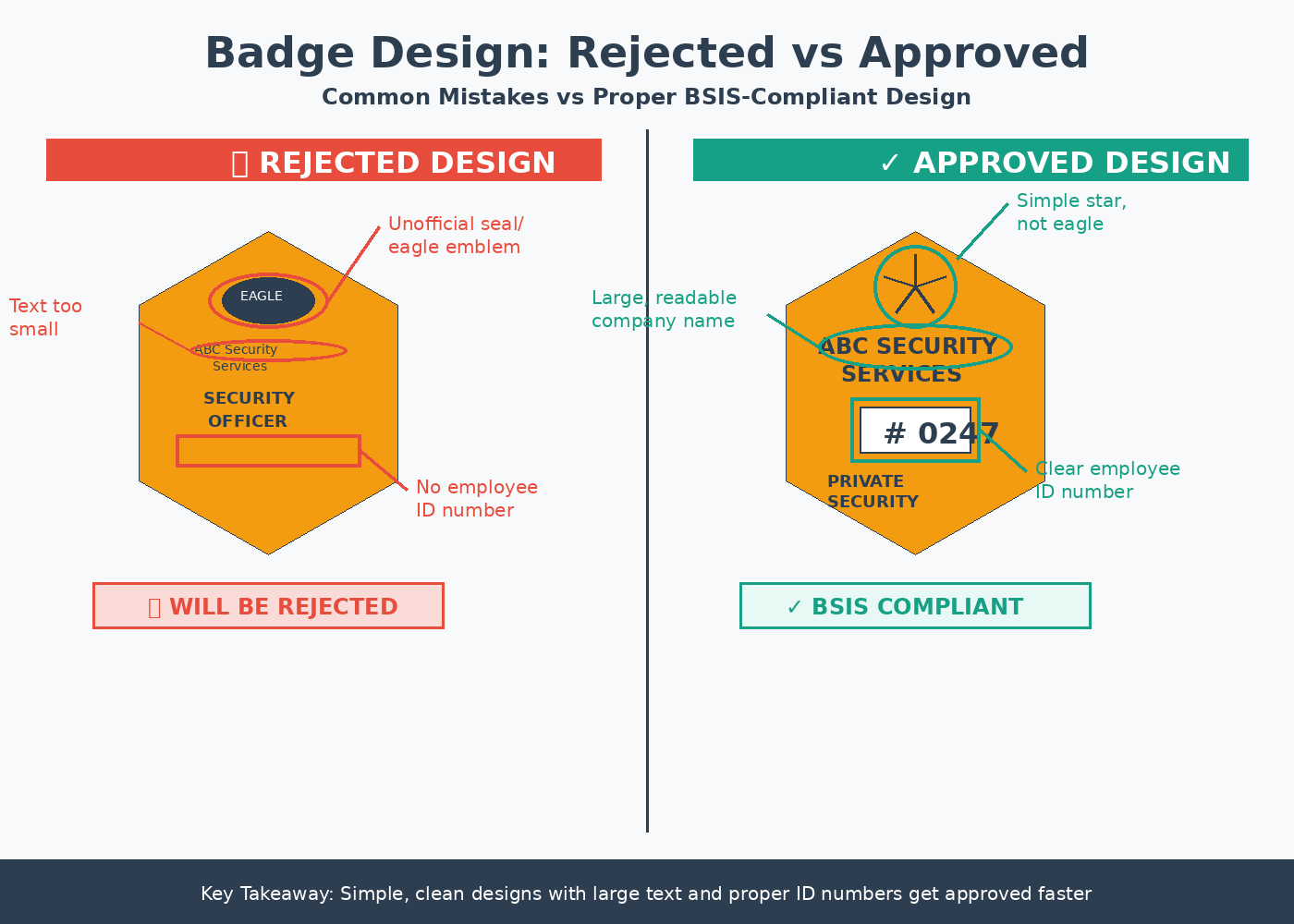
Side-by-side comparison showing rejected design problems versus approved solutions.
Common Mistakes That Delay Approval
Learning from others’ errors saves time and money. Here are the mistakes that trip up companies most often:
Design-Related Mistakes
1. Text Too Small
Many companies create visually appealing designs but forget that text must be readable from several feet away. Officers checking identification need to see company names and badge numbers clearly.
2. Unofficial Seals or Emblems
Adding eagles, shields, stars, or other symbols commonly used by law enforcement creates instant rejection risk. Keep designs simple and commercial-looking, not official or governmental.
3. Wrong Company Name
Your badge and patch must show your company name exactly as it appears on your BSIS license. Abbreviations, nicknames, or variations will be rejected.
4. Missing “Private Security” Text
Patches must prominently display “Private Security” along with your company name. This critical text distinguishes private security from law enforcement.
5. Non-Sequential Badge Numbers
Random badge numbers or identification systems that don’t allow tracking individual employees will be rejected. Use simple sequential numbers: 001, 002, 003, and so on.
Process-Related Mistakes
6. Ordering Before Approval
This is the costliest mistake. Companies that order hundreds or thousands of badges before Bureau approval often face complete losses when designs get rejected.
7. Unauthorized Signatures
Request letters signed by employees, managers, or others without proper authority result in automatic rejection regardless of design quality.
8. Incomplete Submissions
Submitting only a badge without the required patch, or forgetting cap insignia when you plan to use them, creates delays requiring new submissions.
9. Wrong Size Samples
Sending scaled-down images or samples makes it impossible for the Bureau to evaluate actual size and readability. Always submit full-size samples.
10. No Contact Information
Failing to include phone numbers and email addresses prevents the Bureau from requesting clarifications, leading to slower processing or outright rejection.
✨ Pro Tip
Look at examples of approved badges and patches from other California security companies before designing yours. While you can’t copy their exact designs, you can learn what styles and elements the Bureau consistently approves.
Local Jurisdiction Additional Requirements
BSIS approval is mandatory statewide, but some California cities, counties, and municipalities tack on their own requirements for private security uniforms and insignia.
Why Local Requirements Exist
California Business and Professions Code Section 7583.38 specifically allows local jurisdictions to establish their own private security uniform and insignia requirements on top of state-level BSIS standards.
Local governments implement these extra requirements to address specific community concerns about security officer identification, prevent confusion with local law enforcement uniforms, maintain consistent standards within their jurisdiction, and respond to past incidents or community feedback.
Checking Local Requirements
Before finalizing your designs, contact the police department or business licensing office in each city or county where you plan to operate. Ask specifically:
- “Does this jurisdiction have additional requirements for private security badges and patches beyond BSIS standards?”
- “Do you require local approval of uniform designs?”
- “Are there any prohibited colors, styles, or design elements specific to this jurisdiction?”
- “What is the approval process and timeline for local uniform review?”
Major Jurisdictions to Check
While requirements change periodically, several California jurisdictions have historically maintained additional standards. Always check with:
- Los Angeles
- San Diego
- San Francisco
- Sacramento
- Oakland
- San Jose
Some county sheriff’s departments also review security company uniforms to ensure they don’t resemble deputy uniforms.
Timeline and Processing Expectations
Understanding the full timeline helps you plan appropriately for launching your security company or updating existing uniforms.
Complete Process Timeline
Week 1-2: Design and Preparation
- Create badge, patch, and cap insignia designs
- Prepare full-size, full-color samples
- Draft and review request letter
- Gather all required documentation
Week 3: Submission
- Submit application package to BSIS
- Retain copies of all materials
- Note submission date for tracking
Weeks 4-8: Bureau Review
- Processing times vary based on submission volume
- Bureau reviews for compliance
- May request clarifications or additional information
Response and Decision
- Receive approval, conditional approval, or rejection
- If approved, proceed to ordering
- If rejected, begin revision process
Planning Your Launch
For new Private Patrol Operator licensees:
- Begin design work while awaiting your PPO license approval
- Don’t submit badge/patch designs until you have your license number
- Plan for 2-3 months total timeline from design to wearing approved items
- Build this timeline into your business launch schedule
For existing companies updating designs:
- Continue using currently approved items during the review process
- Don’t discontinue old designs until new ones receive approval
- Plan employee transition period when new items arrive
- Collect and properly dispose of old badges when transitioning
Key Takeaways
📋 Key Takeaways: BSIS Badge and Patch Approval
- ✓ Badge and patch approval is mandatory for Private Patrol Operators and most security personnel in California
- ✓ Badges must include company name and employee ID number; patches must include full company name and “Private Security”
- ✓ The Bureau has previously approved badges at least 2″x3″, patches at least 3″x4″, and cap insignia at least 2″x2″
- ✓ Never include government seals, law enforcement symbols, or the Great Seal of California in your designs
- ✓ Submit formal written request letter signed by authorized owner, partner, or officer along with full-size color samples
- ✓ Mail to PO Box 989002, West Sacramento, CA 95798-9002 or use the “Message the Bureau” feature on www.bsis.ca.gov
- ✓ Plan 8-12 weeks total from design to approved manufactured items
- ✓ NEVER order badges or patches before receiving written Bureau approval—this is the most expensive mistake companies make
- ✓ Check for additional requirements from cities and counties where you’ll operate before finalizing designs
- ✓ Violations carry $250 fines per incident under BPC 7582.26 and can affect your license standing
- ✓ Keep simple, professional designs focused on identification rather than appearance for fastest approval
- ✓ Maintain copies of approval letters permanently for company records and potential future audits
Badge approval is just one requirement—see our complete guide on starting a security company in the United States for all licensing requirements.
Conclusion
Navigating the BSIS badge and patch approval process takes attention to detail, patience, and careful compliance with California regulations. The process may seem complex at first glance, but understanding each requirement and following the step-by-step procedures outlined here will help you get approval efficiently.
These requirements exist for good reason—they protect both the public and the private security industry. Clear identification of security personnel through properly designed and approved badges and patches builds trust, prevents confusion with law enforcement, and demonstrates your company’s professionalism.
By investing time to create compliant designs from the start, submitting complete applications with proper authorization, and waiting for approval before ordering manufactured items, you’ll avoid costly mistakes and position your security company for long-term success in California’s regulated private security industry.
Related Articles
Understanding Police Ranks and Badge Insignia
Complete guide to law enforcement rank structures and how they differ from private security designations.
9 min read
How to Start a Security Company in the United States
Step-by-step guide covering business formation, licensing, insurance, bonding, and operational requirements for new security companies.
16 min read
Security Officer Badge Design Guide
Design considerations, material options, and customization features for professional security officer badges.
Product Guide
Additional Resources
For the complete text of relevant statutes, visit the California Legislative Information website and review Business and Professions Code Sections 7582.26, 7582.27, and 7582.28.
Contact BSIS directly:
- Phone: (916) 322-4000 or (800) 952-5210
- Website: www.bsis.ca.gov
- Contact Form: Use “Message the Bureau” on their website
BSIS-approved security companies in California can design armed security badges in gold silver and two-tone finishes.
California badge patch approvals for sheriff offices require specific design standards — the California sheriff 7-point star badge 16-H30 meets the visual standards required by California county sheriff departments.
California security companies getting their badge patch approved through BSIS can also order the California security officer badge 11-D16-2 to complete their officers uniform credential package.